How to Check Ratibi Card Salary: Every Method That Works in 2026
Payday has passed. You pick up your phone and search “Ratibi card salary check” because you want a clear answer fast, not a four-page PDF or a banking jargon article that leaves you more confused than before.
That happens more than you think.
Thousands of workers across the UAE check their Ratibi card balance every single day. Some get their answer in seconds. Others end up going to an ATM because they could not figure out the app. A few call the bank when they did not have to.
This guide covers every working method in 2026, from the fastest online portal to the simplest offline option, so you know exactly where to look and what to do.

What Is a Ratibi Card and Who Is It For?
A Ratibi card is a prepaid payroll card issued by First Abu Dhabi Bank (FAB). It lets employees receive their monthly salary without opening a regular bank account. The card works like a debit card, you can withdraw cash, pay bills, shop online, and use it anywhere Visa or Mastercard is accepted across the UAE and internationally.
The card is specifically for employees earning up to AED 5,000 per month. It runs under the UAE’s Wage Protection System, which means every salary deposit is tracked and protected by MOHRE and the Central Bank.
One thing that surprises many people: employees cannot apply for the card on their own. The employer applies for it, and FAB delivers the cards for distribution to staff. Once you receive your card, though, everything, including your Ratibi card balance check, is in your hands.
Ratibi card vs a regular bank account
Feature | Ratibi Card | Regular Bank Account |
Bank account required | No | Yes |
Monthly fees | None for cardholders | Varies by account type |
Minimum balance | Not required | Often AED 3,000 or more |
Who can apply | Employer only | Individual |
WPS compliant | Yes | Depends on the bank |
Salary advance option | Up to 50% via Payit | Varies |
International use | Yes (Visa/Mastercard) | Yes |
How to Register Your Mobile Number
If you have never used SMS banking, your mobile number may not be registered with FAB yet. Without that, OTPs, salary alerts, and SMS balance checks will not work. New employees must first navigate the FAB login and registration process to securely link their salary card online.
Via FAB mobile app:
- Open the app and log in
- Go to Profile Settings
- Tap Mobile Number, then Change
- Enter the new or correct number
- Enter the OTP that arrives by SMS to confirm
- Done immediately
Via FAB online banking:
- Log in to your account
- Go to Services, then Other Services
- Select Update Mobile Number
- Enter the new number and verify with OTP
Keep your registered number current. Every security step and alert in the system runs through it.
All 8 Ways to Check Your Ratibi Balance
Not everyone wants to read a full guide before knowing which method to use. This table gives you the short version.
Method | Internet Needed | Login Required | How Fast |
PPC Inquiry Portal | Yes | No | Instant |
FAB Mobile App | Yes | Yes | Instant |
Payit App | Yes | Yes | Instant |
FAB Online Banking | Yes | Yes | Instant |
WhatsApp Banking | Yes | OTP only | Instant |
SMS Banking | No | Registered number only | 1–3 minutes |
FAB ATM | No | PIN only | Instant |
Phone / Branch | No | ID required | 3–5 minutes |
The PPC portal is the fastest option if you just want a number without signing in anywhere. The FAB mobile app gives you the most control over your account. SMS works even without the internet.
Pick what fits your situation and go to that section below.
Ratibi Card Benefits
Before getting into the balance check methods, it helps to know what the card gives you. A lot of cardholders do not realise how much comes included.
For employees:
- Free SMS alert every time your salary is credited
- Zero monthly maintenance charges
- Free ATM access at FAB machines across the UAE
- Accepted at 5,000+ stores in the UAE and internationally
- Ability to pay utility bills (Etisalat, du, Salik, Mawaqif)
- Free personal accident insurance, this one is worth reading
The insurance cover breaks down like this:
- Death or permanent total disability due to accident: 5x your monthly salary, up to AED 25,000
- Hospitalisation for 24+ hours due to accident: AED 50 per day, maximum AED 1,500 over 30 days
- Repatriation of mortal remains: actual cost covered, up to AED 5,000
Most cardholders never know this insurance exists until they need it. Spread the word.
For employers:
- One bank transfer pays every employee at once
- Real-time card management through FAB online banking
- Zero cash handling risk
- Full WPS compliance, automatically
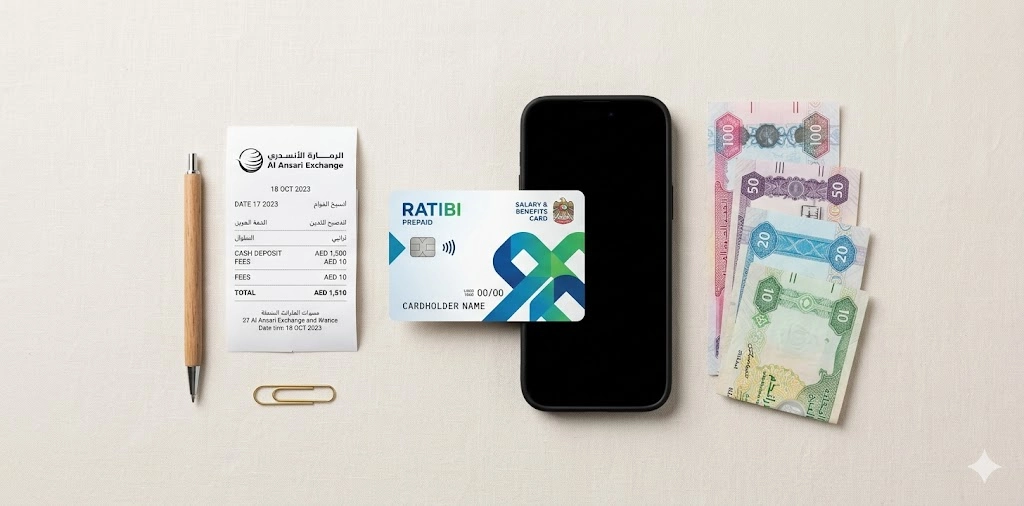
How to Get Your Ratibi Card Statement
A balance tells you what you have right now. A statement tells you where it all went.
Method | What You Get | Good For |
PPC Portal | Balance plus recent transactions | Quick online check |
FAB Mobile App | Full history, downloadable PDF | Personal records |
ATM Mini-Statement | Last 5 to 10 transactions | Fast offline check |
FAB Branch | Official stamped document | Visa, loan applications |
To download a PDF statement through the FAB mobile app:
- Log in and go to Statements or Documents
- Select your Ratibi card
- Choose a month or a custom date range
- Download or email the PDF
An official stamped FAB bank statement from a branch carries more weight for visa and tenancy applications than a digital download, so if you need it for formal use, a branch visit is worth it.

Method 1: PPC Inquiry Portal (Fastest, No Login Needed)
This is the quickest Ratibi card balance check online. You do not need an account, a password, or the app. All you need is your card.
How to use it:
- Open your browser on any device
- Go to the PPC Inquiry portal (search for “Magnati PPC inquiry” to find it)
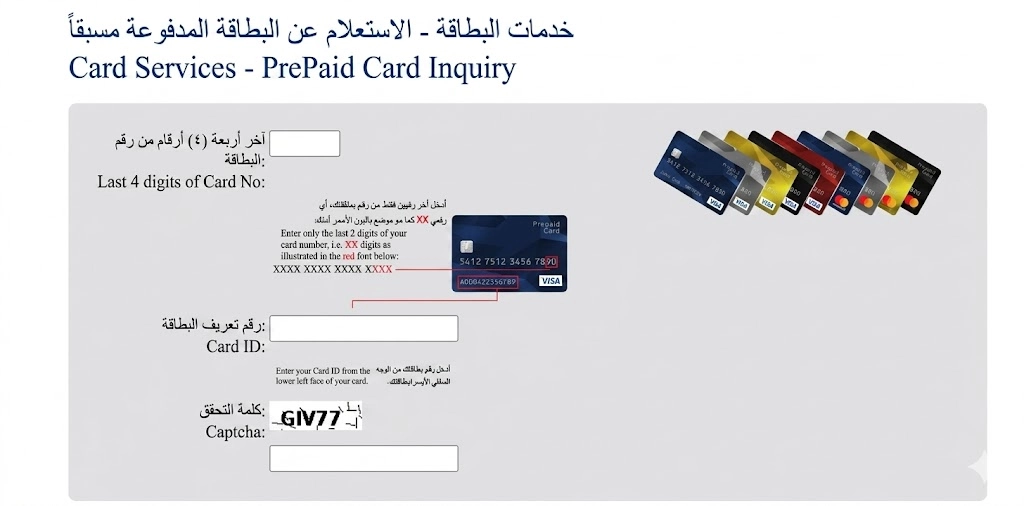
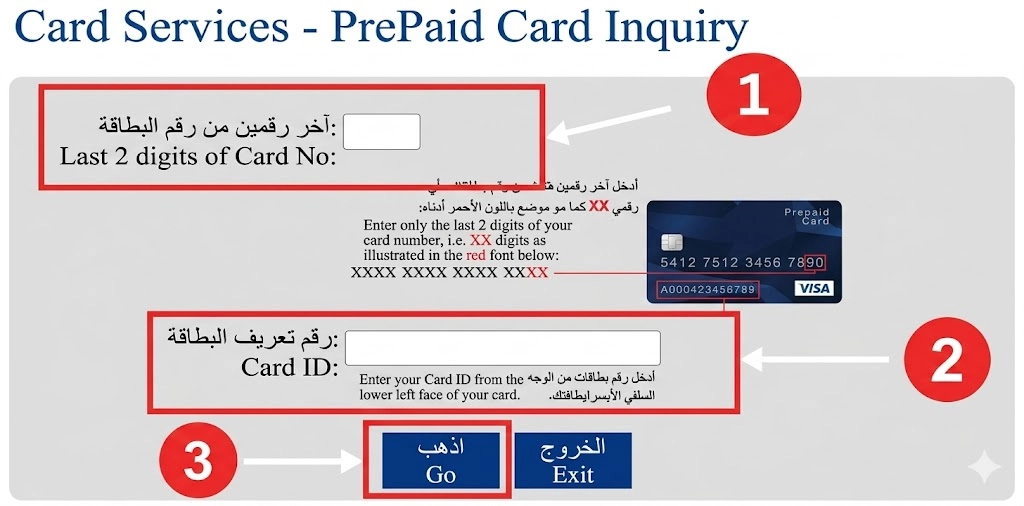
- Enter the last 4 digits of your 16-digit card number
- Enter your 13-digit Card ID (printed below the card number on the card)
- Click “Go”
- Your current balance and recent transactions appear immediately
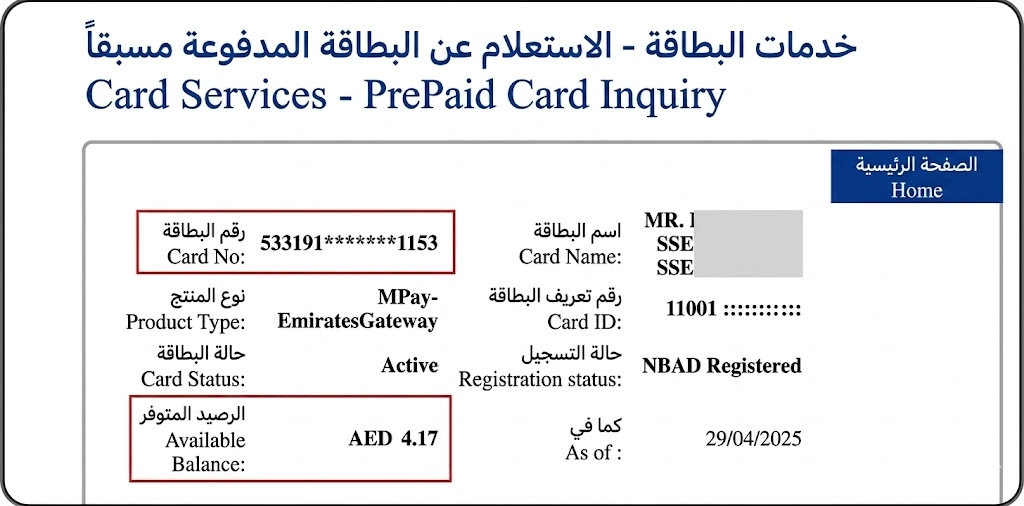
That is it. No registration, no waiting.
Why this method works well:
- Available 24 hours a day, 7 days a week
- Works on any phone, tablet, or computer
- Shows transaction history, not just the balance
- Free to use every time
- Good for a quick Fab balance check without opening any app
The one limitation: it requires the internet. If you are somewhere without data, jump to the SMS or ATM section below.
Method 2: FAB Mobile App (Best for Regular Users)
The FAB mobile app is the most complete tool for managing your Ratibi card salary. Beyond just checking your balance, it handles transfers, bill payments, alerts, and statements, all in one place.
How to set up the app
Download:
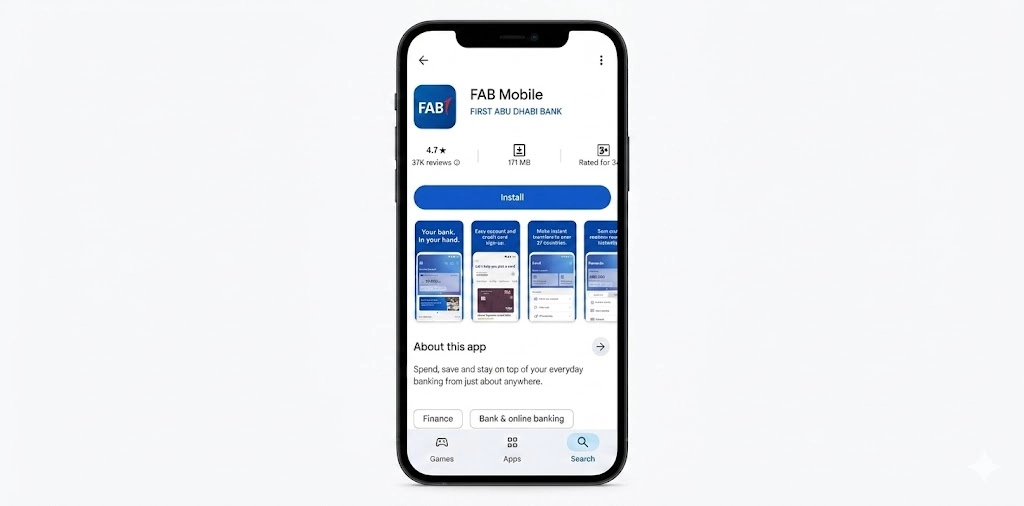
- Android users: search “FAB Mobile” on Google Play Store
- iPhone users: search “FAB Mobile” on the Apple App Store
Register (new users):
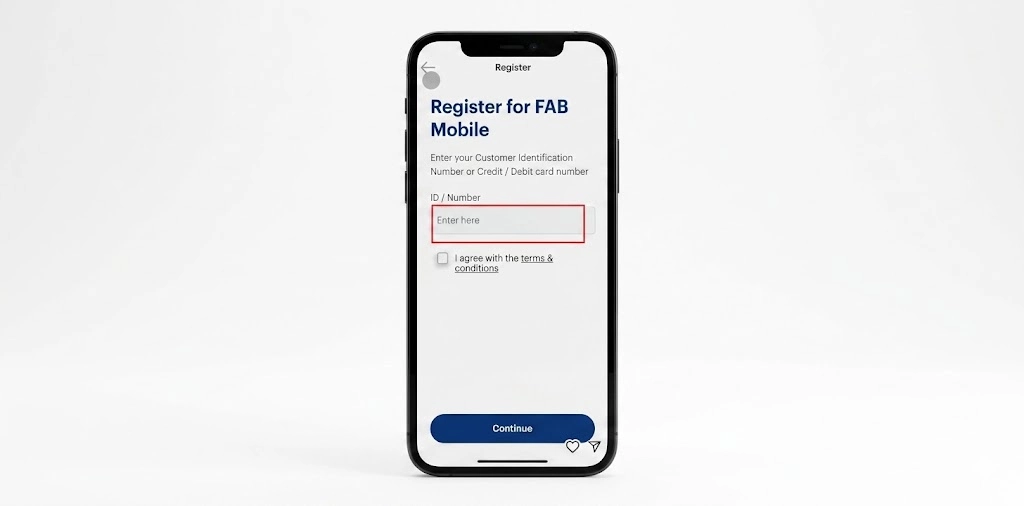
- Open the app and tap Register
- Enter your Emirates ID
- Complete the face scan verification
- Set your login credentials
Log in (existing users):
- Use your username and password, or
- Use biometric login (fingerprint or face recognition) if you have set it up
Once you log in, your Ratibi card balance appears directly on the dashboard. No need to navigate anywhere, it is the first thing you see.
Checking balance and transaction history
- Tap “Accounts” from the main menu
- Select your Ratibi card
- View your current balance, salary deposits, and all recent transactions
- Download PDF statements for any month or custom date range
Other things the FAB mobile app handles
This is where the app earns its place. You can use it for your full FAB salary check online, but it does a lot more:
- Pay Etisalat, du, Salik, and Mawaqif bills directly
- Transfer money to other Ratibi cards or bank accounts locally
- Send money internationally
- Activate a new Ratibi card
- Update your registered mobile number (important for OTP and SMS alerts)
- Set up salary credit notifications
- Access your FAB bank statement anytime
If you use your Ratibi card regularly, this app is worth setting up properly. The biometric login alone saves a lot of time.
Method 3: Payit App (Best for Transfers and Salary Advance)
Payit is a digital wallet powered by FAB. It connects to your Ratibi card and gives you a set of features that the main FAB app does not offer, particularly the salary advance option and international money transfers.
How to set up Payit
- Download the Payit app from Google Play or the App Store
- Open it and select “Ratibi Cardholder.”
- Scan your Emirates ID
- Enter your 13-digit Card ID
- Enter your mobile number and the OTP sent to it
- Set a 4-digit wallet PIN
- Your balance loads immediately on the home screen
What makes Payit worth using
- Salary advance: request up to 50% of your monthly salary before payday, with your employer’s approval
- International transfers: send money to 200+ countries directly from the app
- Bill payments: Etisalat, du, Salik, Mawaqif, and mobile recharge
- Track spending with transaction history and balance updates
- Works as a full digital wallet for online and in-store purchases
If you send money back home regularly, Payit removes the need to visit a money exchange. The Ratibi card balance inquiry through Payit is instant, and the transfer fee structure is clearly shown before you confirm any payment.
Method 4: FAB Online Banking (Desktop Users)
If you prefer checking on a laptop or desktop, the FAB website handles it cleanly.
How to access your Ratibi card balance:
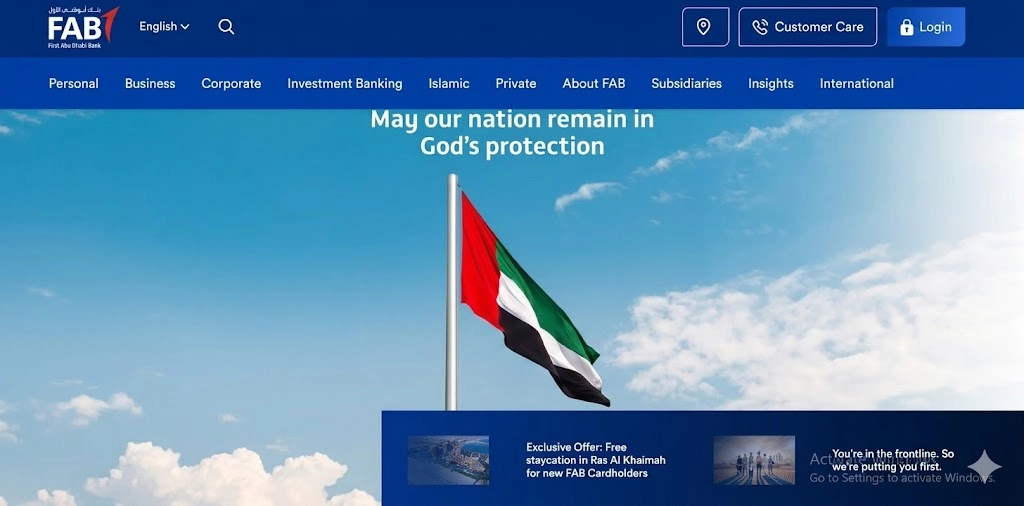
- Visit the official FAB website
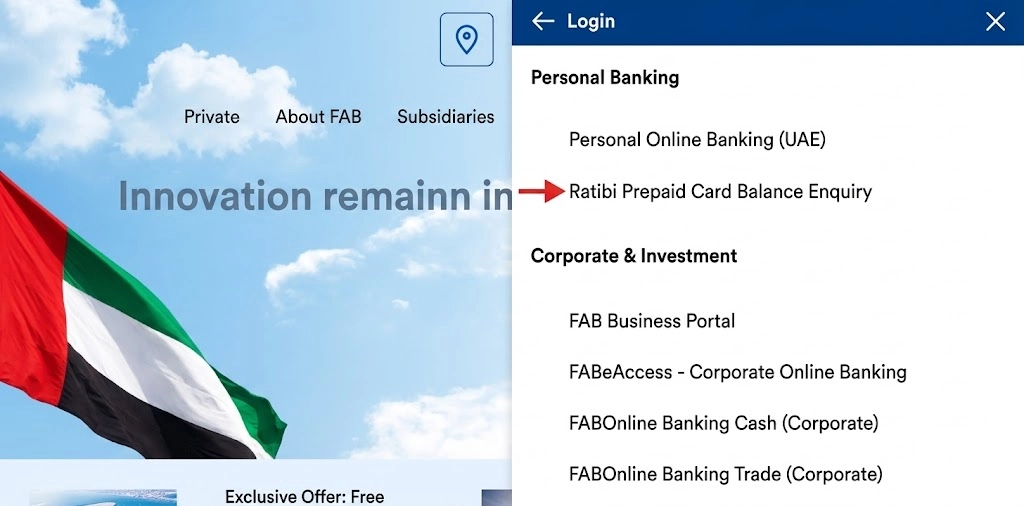
- Log in with your FAB online banking credentials
- Navigate to the Ratibi Prepaid Card Balance Inquiry section
- Enter the last 4 digits of your card number and your 13-digit Card ID
- Click “Go”
This option also gives you access to your full FAB bank statement history, which is useful if you need official records for a visa application, a tenancy contract, or a loan. The FAB online banking features and services section of the portal also lets you update your mobile number, view card activity, and manage account preferences.
Method 6: SMS Banking (Works Without Internet)
No internet at all? This method still works.
How to check your balance via SMS:
- Make sure your mobile number is registered with FAB (you only need to do this once)
- Type: BAL followed by the last 4 digits of your card number
- Example: BAL 5678
- Send it to 2121
- Your current balance arrives as an SMS within 1 to 3 minutes
Free to use. Works on any phone, including basic handsets. Perfect if you are in an area with weak data but a decent mobile signal.
To register your mobile number for SMS banking, use the FAB mobile app under Profile Settings, or log in to FAB online banking and update it through the Services menu. Both require OTP confirmation once.
Method 7: ATM Balance Check (Offline, Instant)
The ATM option needs no internet, no app, and no registration. If you have your card and your PIN, you can check your balance anywhere there is a FAB machine.
How to check balance at an ATM:
- Find a FAB ATM (use the FAB ATM near me search to locate the closest one)
- Insert your Ratibi card
- Enter your 4-digit PIN
- Select “Balance Inquiry” from the menu
- Your balance appears on screen
- You can also print a mini-statement showing the last 5 to 10 transactions
A few practical notes:
- FAB ATMs are free for this
- Non-FAB ATMs may charge a fee, so stick to FAB where possible
- If the ATM keeps your card, visit the nearest FAB branch immediately and bring your Emirates ID
- You can also change your PIN at any FAB ATM without calling the bank
Method 8: Phone and Branch Support
Sometimes the digital options just are not what you need. Maybe you need an official stamped statement. Maybe your card is lost. Maybe you have a dispute. For those situations, calling or visiting in person is the right move.
Contact numbers for Ratibi card support:
Channel | Number | Who It Is For |
UAE Ratibi Helpline | 600 52 2298 | UAE residents, all Ratibi queries |
International Ratibi Line | +971 2 499 6279 | Outside UAE or urgent international queries |
General FAB UAE | 600 52 2235 | All FAB services including Ratibi |
General FAB International | +971 2 681 1511 | Expats abroad, overseas inquiries |
Email Support | atyourservice@bankfab.com | Detailed queries, complaints |
When to visit a branch:
- Lost or blocked card
- Official printed statement for visa or loan applications
- Transaction disputes
- Card replacement after ATM retained it
- Any issue that phone support could not resolve
Bring your Ratibi card and your Emirates ID to any FAB branch. The staff will handle most requests the same day.
How to Activate a New Ratibi Card
Your employer gives you the card. But before it works for anything, you need to activate it.
Activation via the FAB mobile app:
- Download and open the app
- Register with your Emirates ID and face scan if you are new
- Go to Account Services or the Cards section
- Select your Ratibi card from the list
- Tap Activate
- Enter your card number, expiry date, and CVV
- Confirm
The whole process takes around two to three minutes on a stable connection. After activation, do a quick test, either a small purchase or a balance check through the app.
If activation fails:
- Double-check all card details match exactly
- Make sure your internet connection is stable
- Call FAB at +971 2 499 6279 for direct help
How to Apply for a Ratibi Card: The Employer's Process
This section is for employers or HR managers handling payroll. Employees receive the card once the employer completes the application.
Documents needed:
- Employer: active FAB corporate account, MOHRE registration details
- Employee details: Emirates ID copies, visa copies, labor card copies
- Completed Ratibi application form and iBanking form
- Employee list in Excel format (names, salaries, mobile numbers, emails)
Application steps:
- Employer contacts the nearest FAB branch
- Submits all documents and the employee details file
- FAB reviews and processes the application in 5 to 10 business days
- Cards are delivered to the employer for distribution
One important point: the salary eligibility limit is AED 5,000 per month. Employees earning above this are not eligible for the Ratibi prepaid card.
WPS vs Non-WPS What Ratibi Card Users Should Know
The Wage Protection System (WPS) is the UAE government’s way of making sure private sector employees get paid on time and in full. MOHRE and the Central Bank both monitor it. If your employer uses WPS, your salary goes into your Ratibi card on the agreed date and there is a full digital record of it.
Non-WPS applies mostly to senior management and executives. Salaries go directly as bank transfers, without the same level of government monitoring. Still legal, still bound by labour law deadlines, but with fewer safeguards for the employee.
WPS vs Non-WPS at a glance:
Feature | WPS | Non-WPS |
Government salary monitoring | Yes | No |
Required for most workers | Yes | No (senior staff only) |
Salary protection | Full | Contract-based only |
Works with the Ratibi card | Yes | Rarely |
Transparency | Complete digital record | Company records only |
If your employer is WPS-registered and uses Ratibi cards, your salary is protected. Any delay or non-payment gets flagged to MOHRE automatically.
How to Transfer Money from Your Ratibi Card
Your Ratibi card is not just a way to receive a salary. You can also send money with it, both inside the UAE and internationally.
Local transfers
- FAB Mobile App: instant, requires OTP confirmation
- FAB ATM: works for UAE bank transfers, offline option
- FAB Branch: best for large amounts or complex instructions
International transfers
- Payit App: send to 200+ countries, fee shown before confirming
- FAB Online Banking: international wire transfers
- FAB Branch: for large international transfers
Before any transfer:
- Confirm your available balance first through any Ratibi card balance inquiry method
- Double-check the recipient’s name, account number, IBAN, and bank name
- Save the transaction reference number after confirming
Security Tips to Keep Your Salary Safe
- Use only official channels for your Ratibi card balance check online: the FAB website, the FAB app.
- Never share your 4-digit PIN with anyone, including your employer
- Avoid checking your balance or making transfers on public Wi-Fi networks
- Turn on biometric login on the FAB mobile app
- Keep SMS alerts active so any unexpected transaction shows up immediately
- Log out of FAB online banking after every session
- Update the app whenever a new version is available
- If you see a transaction you do not recognise, call 600 52 2298 the same day
One thing that catches a lot of people: phishing messages that look like FAB alerts. FAB will never ask for your full card number or PIN over SMS or WhatsApp. If a message asks for that, it is not from the bank.
Frequently Asked Questions
Is checking my Ratibi card balance free?
Yes. All methods are free: the PPC portal, the FAB app, Payit, SMS, and ATM at FAB machines. Other bank ATMs may charge a small fee, so use FAB ATMs when possible.
How do I check my Ratibi NBAD card balance?
NBAD (National Bank of Abu Dhabi) merged with FAB in 2017. All NBAD Ratibi cards now operate under FAB. Use the PPC inquiry portal, the FAB mobile app, or call 600 52 2298. The process is identical to a standard Ratibi card balance inquiry.
Can I check my balance without internet access?
Yes. Two ways: send BAL [last 4 digits of your card] to 2121 via SMS, or visit any FAB ATM and select Balance Inquiry. Neither requires internet.
Can I check my FAB prepaid card balance outside the UAE?
Yes. The Magnati PPC portal and FAB mobile app both work internationally. For ATM balance checks abroad, use any Visa or Mastercard ATM, depending on your card’s network. Fees may apply at non-FAB machines.
What if my salary did not arrive on payday?
Contact your employer first. If they confirm the transfer was made, call FAB at 600 52 2298 with the transaction details. Salaries processed through WPS typically credit instantly on the scheduled date.
Can I use my Ratibi card outside the UAE?
Yes. The card works at Visa and Mastercard locations globally. ATM withdrawals abroad are possible too, though fees may apply depending on the network.
How do I get a salary advance on my Ratibi card?
Through the Payit app. The “money on demand” feature lets you request up to 50% of your monthly salary in advance, subject to your employer’s approval. Download Payit, link your Ratibi card, and request from within the app.
What should I do if I forget my PIN?
Go to any FAB ATM and use the PIN change option, or call FAB support to guide you through the reset process. Do not try to guess your PIN more than three times, as it will lock the card.
How do I check my Ratibi card balance online without the app?
Use the PPC Inquiry portal (search for Magnati PPC inquiry in your browser), enter the last 4 digits of your card number and your 13-digit Card ID, then click Go. Your balance loads instantly with no login required.