FAB Login: Complete Online Banking Registration Guide 2026
You want to log in to your FAB account, but something stops you. Maybe the app is asking for a step you have not done before. Maybe you are new to First Abu Dhabi Bank and have no idea where to start. Or maybe you just want to register for online banking, but do not know which platform to use.
These are the exact questions most FAB customers search for. The process is not complicated once you know what you are doing. This guide covers every login method FAB offers in 2026, walks you through online registration from scratch, and explains what to do when things go wrong. Whether you bank personally, run a business, or manage a corporate account, the right steps are all here.
FAB Login Platforms: Which One Do You Need?
First Abu Dhabi Bank runs different login systems for different account types. Using the wrong one wastes time. Here is a quick breakdown so you go to the right place from the start.
Platform | Who It Is For | How to Access |
FAB Mobile App | Personal banking customers | Google Play, App Store, Huawei AppGallery |
FAB Online Banking (Web) | Personal banking via desktop | Bankfab website |
FAB Business Login | SMEs and free zone companies | Bankfab Business portal |
FABeAccess | Large corporations | Fabeaccess website |
FAB ibanking | Corporate web access | Ibanking website |
FAB Credit Card / Prepaid Login | Cardholders and prepaid users | Inside FAB Mobile App |
Most personal customers use the FAB Mobile App for everything. The web version gives you the same features on a bigger screen. Corporate and business users have dedicated portals with more advanced tools.
Documents Required for FAB Registration
Having the right documents ready before you start saves a lot of back and forth. What you need depends on whether you are registering as an individual or a business.
For Individual Customers
- Emirates ID (front and back, clear scan)
- Valid passport with UAE resident visa page (for expats)
- Proof of address: recent utility bill or tenancy contract
- Salary certificate if you are opening a salary-linked account
For Business Account Registration
- Valid UAE trade license
- Company Memorandum of Association
- Passport and Emirates ID of all authorized signatories
- Chamber of Commerce registration document
FAB Account Types You Can Open Online in 2026
Once you complete registration, you will access the account you opened. FAB offers several account types online, each suited to different needs. You can check your full account details and balance through the Fab Balance Check tool after logging in.
Account Type | Minimum Balance | Monthly Fee | Best For |
Current Account | AED 3,000 | AED 25 (waived if min. balance maintained) | Salaried employees, frequent transactions |
Savings Account | AED 3,000 | AED 25 (waived if min. balance maintained) | Growing a savings pot with interest |
iSave Account | None | No fee | High-yield digital savings, no branch needed |
Zero Balance Account | AED 0 | No fee | Students, low-income residents |
Islamic Current/Savings | AED 3,000 | AED 25 (waived) | Sharia-compliant banking |
Business Current Account | AED 10,000 | AED 75 (waived if balance maintained) | SMEs, free zone businesses |
The FAB zero balance account isave option is worth knowing about if you want to avoid minimum balance requirements entirely. The iSave account also has no paperwork and no minimum, making it popular with younger customers.
How to Log In to FAB Mobile App (2026)
The FAB Mobile App is the fastest way to access your account. The login itself takes under 30 seconds once you are set up.
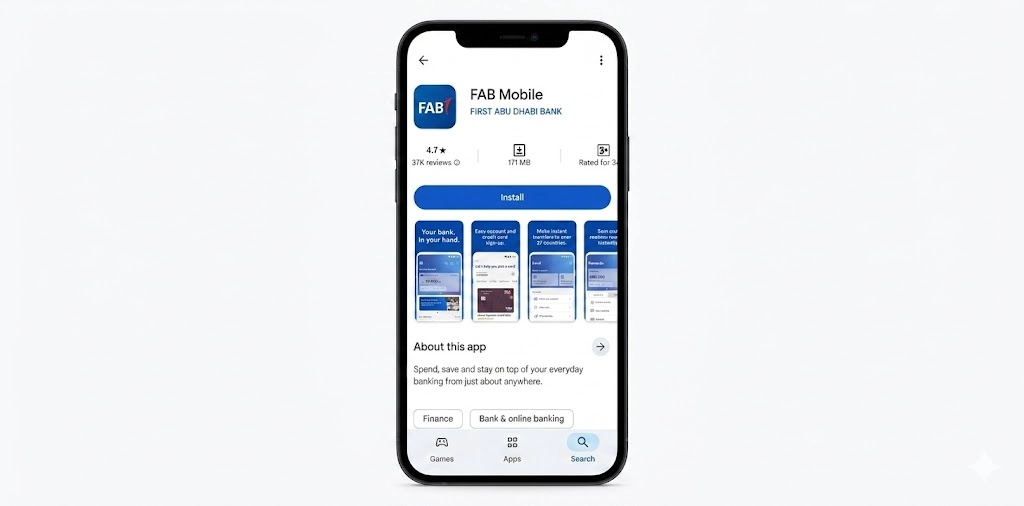
Step 1: Download the FAB Mobile App
- Android users: search “FAB Mobile” on Google Play Store
- iPhone users: download from the Apple App Store
- Huawei users: find it on AppGallery
Always download from official app stores only. The bank does not send download links via SMS or email.
Step 2: Log In as an Existing Customer
Once the app is installed, here is how to get in:
- Open the FAB Mobile App
- Tap “Already a Customer”
- Choose your login method: Card Number or Customer Number
- Enter your card details
- Scan your Emirates ID (front and back) when prompted
- Complete the face verification liveness check
- Set your swipe pattern and mobile PIN
- You are in
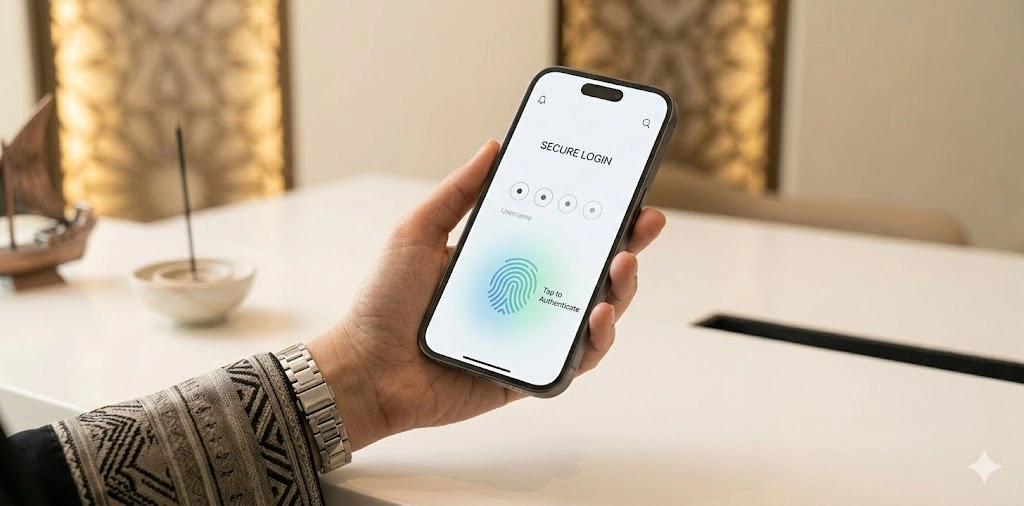
After your first login, you use Face ID, fingerprint, or your PIN to get in every time. No need to scan your Emirates ID again.
Step 3: Biometric Login for Returning Users
Once you complete the setup above, daily login is simple:
- Face ID or fingerprint unlocks the app instantly
- Alternatively, enter your 6-digit PIN
- The app stays logged in on trusted devices for up to 30 days
- Sensitive actions like large transfers still require re-authentication
FAB Online Banking Registration: How to Sign Up for the First Time
If you already have a FAB bank account but have never used online banking, you need to register separately. The registration process takes about 10 minutes.
Who Can Register
Before you start, make sure you meet the basic requirements:
- You are 18 years or older
- You hold a valid Emirates ID
- You have an active FAB bank account
- Your mobile number is registered with FAB (you need it for OTP)
Expats also need a valid UAE resident visa linked to their account.
Step-by-Step FAB Online Registration
- Visit bankfab or open the FAB Mobile App
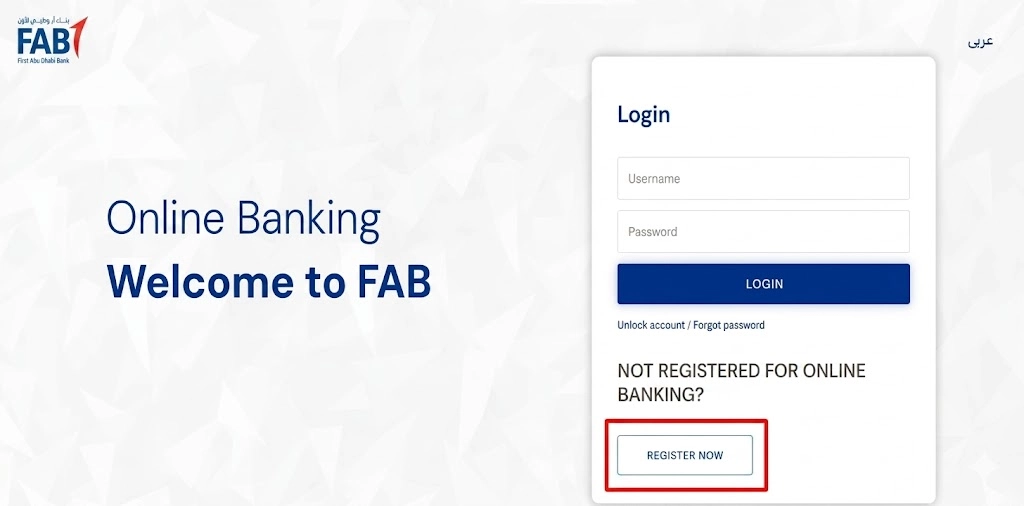
- Click or tap “Register Now” on the login screen
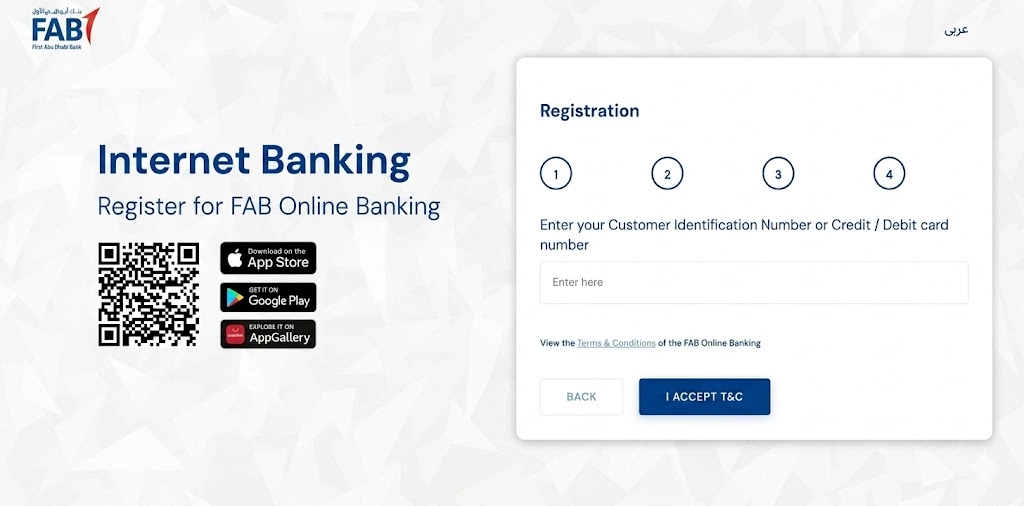
- Enter your Customer ID or linked card details
- Read and accept the terms and conditions
- An OTP gets sent to your registered mobile number
- Enter the OTP to verify your identity
- Create your username and password
- Registration is complete
After this, use your new username and password every time you log in via the web. The app has a separate registration path.
FAB Online Registration Through the Mobile App (New Customers)
New UAE residents can open a FAB account and complete registration entirely on their phone, without visiting a branch:
- Tap “Join FAB” on the app home screen
- Choose your preferred account type (Savings, Current, iSave, or Islamic)
- Scan your Emirates ID front and back
- Complete the face verification step
- Your account activates within minutes
- Debit card gets dispatched to your registered address
This is one of the fastest account-opening processes among UAE banks right now. No paperwork, no branch visit, no waiting.
FAB Online Banking Login via Desktop or Browser
Some people prefer doing their banking on a laptop or desktop. FAB Online Banking gives you full personal account access through any web browser.
How to Log In on the Web
- Go to the Bankfab website
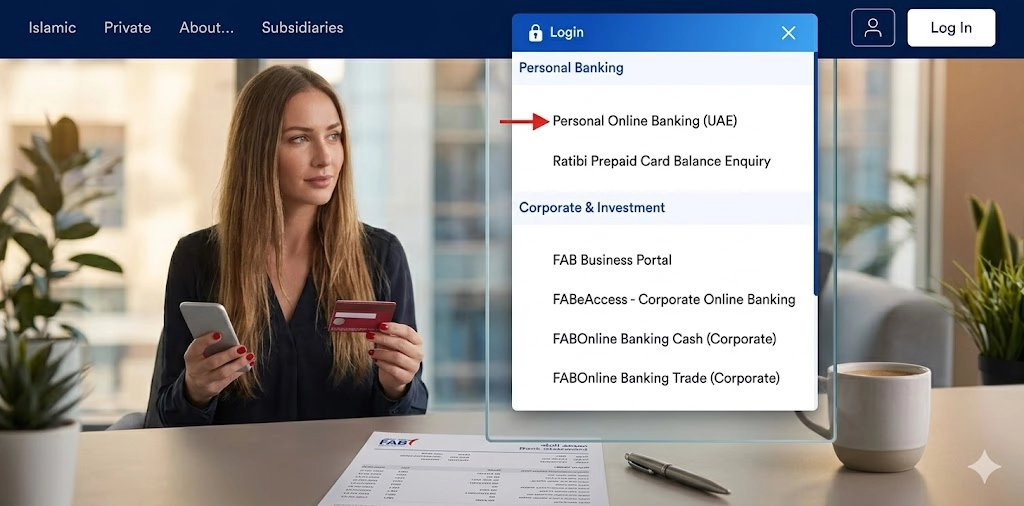
- Click “Login” then select “Personal Online Banking.”
- Enter your username and password
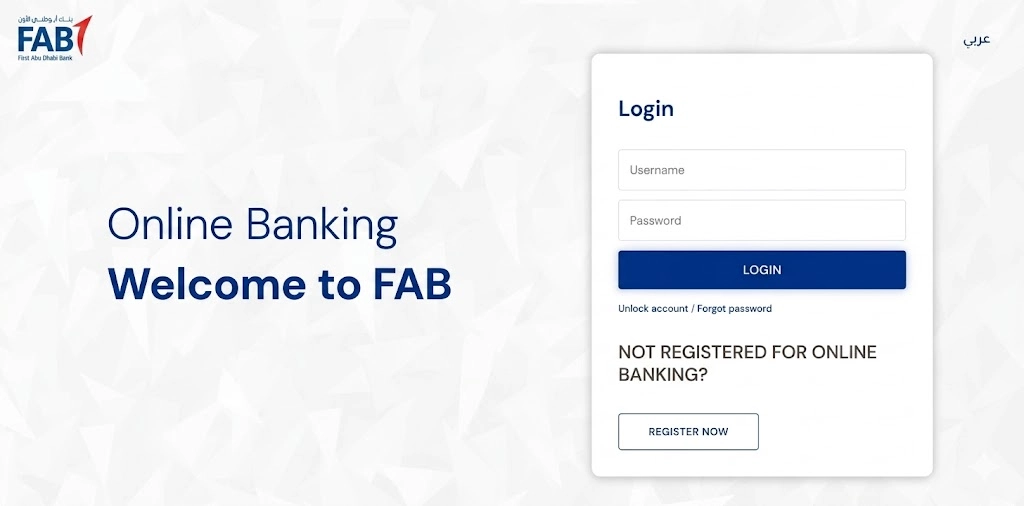
- Enter the OTP sent to your registered mobile number
- Your account dashboard opens
That is it. The web version and the mobile app give you access to the same account. Use whichever is more convenient for the task at hand.
FAB Password Policy in 2026
FAB requires a strong password. If you are setting one up or resetting it, it must meet these rules:
Requirement | Detail |
Minimum length | 10 characters |
Uppercase letters | At least 1 required |
Lowercase letters | At least 1 required |
Numbers | At least 1 required |
Special characters | At least 1 required (e.g. @, #, !) |
Password refresh | Every 90 days |
Do not use your date of birth, Emirates ID number, or phone number as part of your password. These are the first things fraudsters guess.
FAB Business Login: What SMEs Need to Know
Small and medium businesses have a dedicated login path. FAB Business Login gives you the tools to manage company payments, bulk transfers, and cash flow from one place.
How to Get FAB Business Login Access
Unlike personal accounts, business login credentials do not come automatically. You need to set them up:
- Contact the FAB Corporate Banking team with your company documents
- Submit a valid UAE trade license and company authorization forms
- Receive your login credentials by secure communication
- Activate the account and complete the initial security setup
- Log in through the designated business banking portal
What FAB Business Login Lets You Do
- Submit bulk payment files for payroll and supplier payments
- Track real-time cash positions across multiple accounts
- Deposit cheques digitally through the mobile capture feature
- Access foreign exchange services for international payments
- Run compliance reports for audits
- Manage multiple authorized users with role-based access
Benefits of FAB Online Banking
This is where the account actually earns its keep. The FAB online banking dashboard is well-organized and once you know where things are, most tasks take under two minutes.
Account and Balance Management
- View all account balances in one place
- Download account statements, stamped or unstamped, directly from the app
- Generate your IBAN number without calling the bank
- Set up e-statements and choose how often you receive them
- Submit a cheque book request in the app
- View signed documents like loan agreements and credit card contracts
- Access your FAB bank statement download any time
Money Transfers: Local and International
FAB online banking handles both local and international transfers. The fees and timelines vary by destination.
Transfer Type | Speed | Fee |
FAB to FAB | Instant | Free |
UAE inter-bank (UAEFTS) | Same day | Minimal |
International SWIFT | 1 to 3 business days | Competitive rates |
Remittance to Pakistan, India, Philippines, Sri Lanka | Near-instant | Zero fee |
Europe and UK transfers | Within seconds | Varies |
You can also send money to digital wallets, including GCash, JazzCash, and eZ Cash. FAB supports recurring transfers so you can automate monthly family remittances or bill payments without logging in every time.
Bill Payments
Pay utility and government bills directly through the app or web portal:
- DEWA, SEWA, AADC (electricity and water)
- Etisalat and du (telecoms)
- SALIK (road toll)
- Insurance premiums
- School and university fees
You can set up automatic bill payments so your bills clear without manual action each month.
Card Management
FAB gives you full control over your debit and credit cards through online banking. You do not need to call the bank or visit a branch for most card-related tasks.
- Activate a new card
- Block or freeze a card instantly if it gets lost or misused
- Unblock it when found
- Reset your card PIN online
- Turn international transactions on or off
- Connect your card to Apple Pay
- View pending and cleared transactions by card
If you use a prepaid card or Ratibi Card, you manage those the same way. Check the FAB prepaid cards enquiry and Ratibi card sections for more details on those products.
FAB Rewards
FAB Rewards is the bank’s loyalty program. Every dirham you spend on your FAB card earns points.
- Earn rewards on everyday purchases
- Spend AED 1 per day on Amazon through the app and earn up to 10 FAB Rewards per day
- Redeem points at selected retail stores and online partners
- Earn additional rewards when you refer friends to FAB
Points do not expire as long as your account stays active. If you lock yourself out of your account by forgetting your PIN, you may need to reset it at a physical terminal; use our FAB ATM near me tool to find one.
FABeAccess and FAB ibanking Login for Corporate Clients
Large organizations use two corporate-grade platforms: FABeAccess and FAB ibanking. Both offer enterprise-level tools that go well beyond what personal banking provides.
Feature | FABeAccess | FAB ibanking |
Real-time global cash visibility | Yes | Yes |
Multi-currency accounts (AED, USD, EUR, GBP) | Yes | Yes |
Bulk payment processing | Yes | Yes |
Role-based user access | Yes | Yes |
API integration with ERP systems | Limited | Full |
Detailed audit trails | Yes | Yes |
IP whitelisting | Yes | Yes |
Mobile app access | Yes (FABeAccess app) | Browser only |
FABeAccess also has its own mobile app, available on Google Play and the App Store. Corporate users can approve transactions on the go, receive push notifications for pending approvals, and view account reports without sitting at a desktop.

Security Tips Every FAB Customer Should Follow
Good security is mostly about habits. These practices reduce your risk significantly.
What to do:
- Use a password that is at least 10 characters and unique to FAB
- Turn on biometric login so your phone is the second factor
- Log out every time you use a shared or public device
- Keep the FAB Mobile App updated to get the latest security patches
- Regularly review your transaction history for anything unfamiliar
What to avoid:
- Never share your OTP with anyone, including people claiming to be from FAB
- Do not use public Wi-Fi for banking without a VPN
- Do not click links in SMS or email claiming to be from FAB unless you verify the sender address
- Do not store your password in notes on your phone
Spotting a Phishing Attempt
Method | Red Flag | What FAB Actually Does |
Urgent requests, generic greetings, odd sender address | Sends only from bankfab, never asks for passwords by email | |
SMS | Shortened links, OTP requests from unknown numbers | OTPs come from the registered bank number only |
Phone call | The caller demands the OTP or account number immediately | FAB never asks for your PIN or full card number over the phone |
If you ever receive a suspicious message claiming to be from FAB, report it directly to the fraud-reporting email.
Pay utility and government bills directly through the app or web portal:
- DEWA, SEWA, AADC (electricity and water)
- Etisalat and du (telecoms)
- SALIK (road toll)
- Insurance premiums
- School and university fees
You can set up automatic bill payments so your bills clear without manual action each month.
Common FAB Login Problems
Most login issues have a quick fix. Run through this table before contacting customer support.
Problem | What to Do |
Forgot password | Click “Forgot Password” on the login page and follow the OTP reset steps |
Account locked after failed attempts | Call 600 52 5500 or use the “Unlock Account” option on the login screen |
OTP not arriving | Check your network signal, confirm your registered mobile number is active, wait 60 seconds and retry |
App not loading or crashing | Update the app, clear the cache, restart your phone, or reinstall from the official app store |
Device not recognized | Approve the new device login from a previously registered device |
Emirates ID expired | Update your ID via the app: Menu > Edit Profile > Documents. Processing takes 3 to 4 working days |
Forgot username | Use the “Forgot Username” option and verify with OTP |
One common cause of OTP delays is a mismatch between your registered mobile number and your current SIM. If you changed your number and did not update it with FAB, the OTP goes to the old number. Call customer support to fix this before trying to log in again.
Frequently Asked Questions
How do I register for FAB online banking for the first time?
Go to the BankFab website and click “Register Now.” Enter your Customer ID or card number, verify with an OTP, then create your username and password.
Can I open a FAB bank account online without going to a branch?
Yes. New customers can complete the entire process through the FAB Mobile App. You scan your Emirates ID, complete face verification, and your account activates within minutes.
What should I do if I forget my FAB login username?
Use the “Forgot Username” option on the login page. Verify your identity with an OTP, and your username gets sent to your registered email or displayed on screen.
How long does a FAB online banking session stay active?
The mobile app keeps you logged in on trusted devices for up to 30 days. The web banking session times out after a period of inactivity, typically around 10 minutes.
Is FAB mobile banking safe to use outside the UAE?
Yes. The FAB Mobile App works in any country. Your security settings and two-factor authentication apply regardless of location. Make sure your registered mobile number is active and receiving SMS.
What is the minimum salary to open a FAB account online?
It depends on the account type. Current and savings accounts typically require a minimum monthly income of AED 3,000. The FAB zero balance account has no salary requirement.
How do I update my Emirates ID in the FAB Mobile App?
Go to the main menu, tap “Edit Profile,” select “Documents,” then choose Emirates ID and upload the updated scans. FAB processes document updates within 3 to 4 working days.